
Browser SQL editor
Excel SQL Editor Online
Use a small, focused PostgreSQL editor when opening a full database tool would take longer than answering the question.
The problem
A five-line query should not require half an hour of database setup. Yet that is often what happens when the source arrives as an Excel attachment.
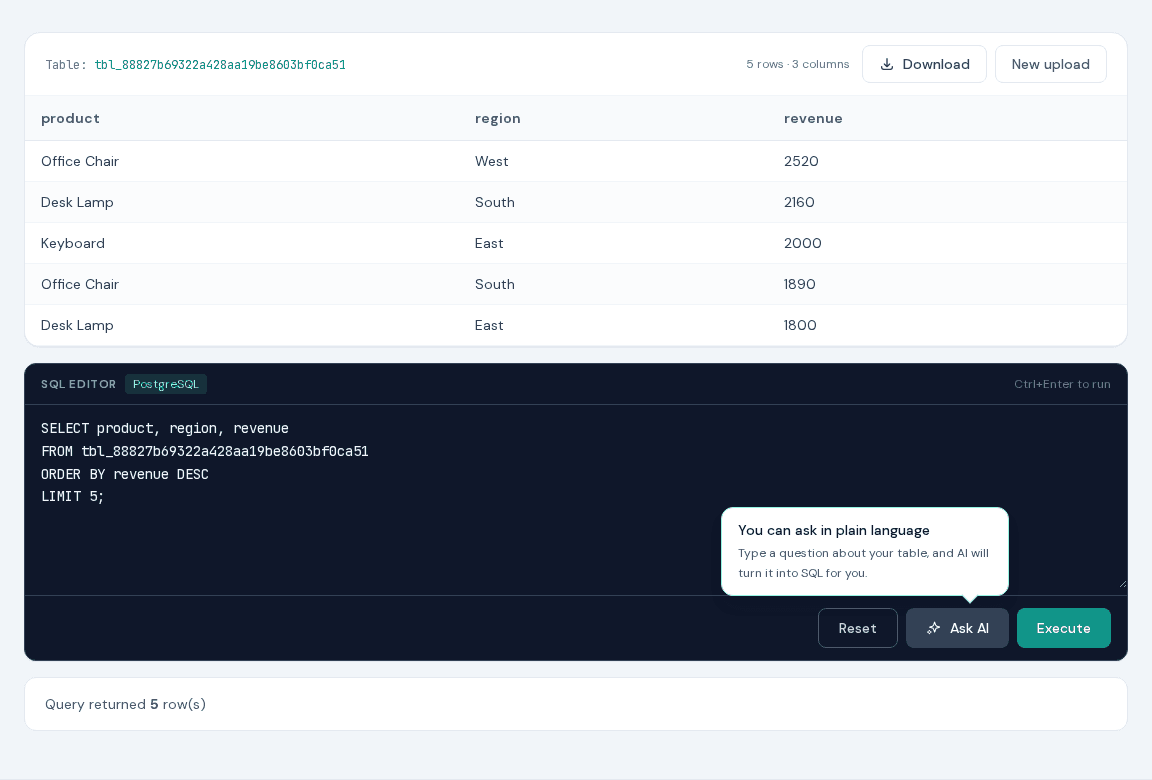
Here the preview does the useful orientation work: it shows the imported columns and the table name. From there, Ctrl+Enter runs the query, and the AI helper is available if the syntax does not come to mind.
Try the recipe
- 1Upload the sales demo and note the temporary table name shown in Data preview.
- 2Paste the query and replace tbl_your_session with that table name.
- 3Execute it in the editor and verify the top five rows.
- 4Download either the query result or the session table.
Ready-to-use query
Inspect the five highest-revenue rows.
SELECT product, region, revenue
FROM tbl_your_session
ORDER BY revenue DESC
LIMIT 5;
Replace tbl_your_session with the table name displayed after upload. The supplied demo is an .xlsx file; XLS-SQL also accepts XLS, CSV, TSV, ODS, JSON, HTML, and Parquet. On the AI page, the block is a prompt for Ask AI.
Why XLS-SQL fits this job
- Anyone who knows PostgreSQL will recognize the syntax immediately.
- The preview exposes the actual imported names before you write the query.
- Ctrl+Enter keeps the edit-run-check loop quick.
- When enabled, the AI helper can turn a plain-language request into an editable first draft.
Tips & tricks
- Run a small SELECT first; it catches unexpected headers before they spread through a longer query.
- Use Ctrl+Enter instead of reaching for the Run button while editing.
- Add aliases to expressions so downloaded columns have useful headings.
- Treat AI output as a draft: check filters, joins, grouping, and ordering before running it.
FAQ
Which SQL dialect does the editor use?
XLS-SQL runs queries on PostgreSQL, so PostgreSQL SELECT syntax and functions are the best fit.
Can a query access other users' tables?
No. The validator restricts each session to its own generated table and blocks system catalogs and unrelated tables.
Is registration required?
No. The current tool creates a temporary session without an account.