
Core workflow
Query Excel with SQL Online
Got a workbook and a question? Upload the file, write the query, and download the answer—there is no database to set up first.
The problem
Spreadsheets are easy to pass around. They are less pleasant when the same filter or summary has to be rebuilt every week, especially once several formulas depend on one another.
XLS-SQL gives that job a shorter route: upload the file, query the first worksheet with PostgreSQL, check the rows on screen, and download the result.
Try the recipe
- 1Download the sample .xlsx demo or use a supported file of your own.
- 2Upload it with the first-row header option enabled.
- 3Replace the table name in the query below with the tbl_… name shown above the preview.
- 4Run the query with Ctrl+Enter, inspect the result, and choose Download result.
Ready-to-use query
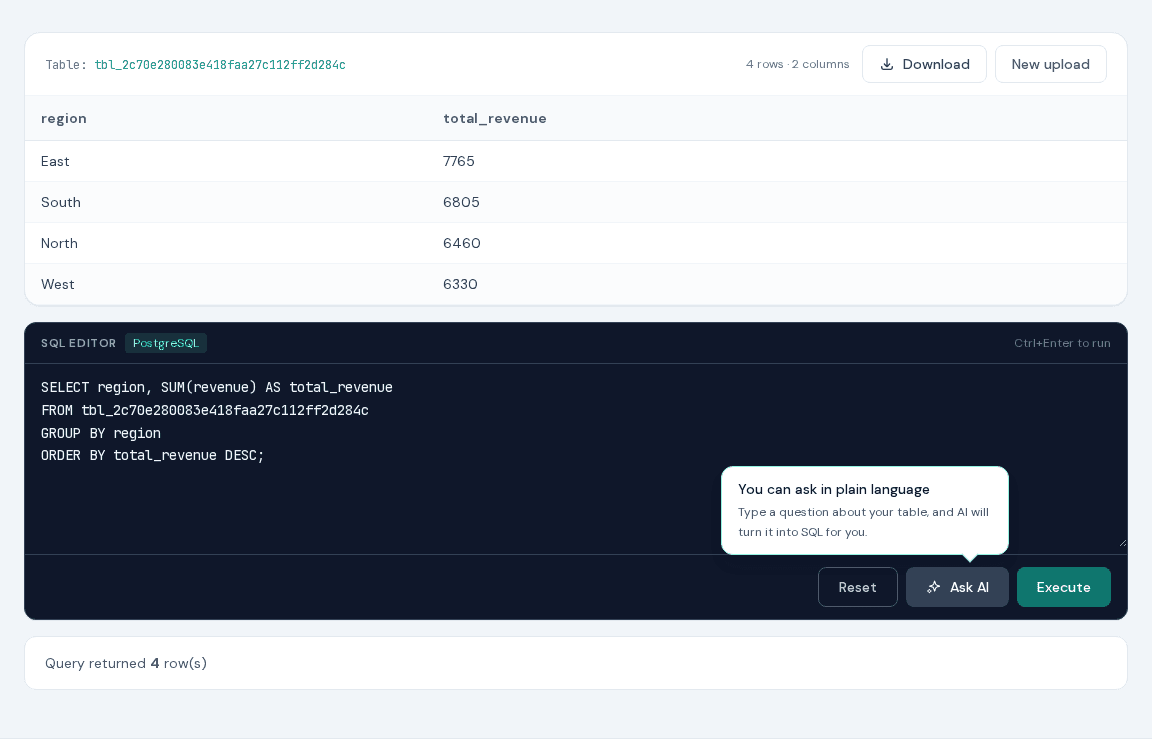
Summarize revenue by region and put the largest total first.
SELECT region, SUM(revenue) AS total_revenue
FROM tbl_your_session
GROUP BY region
ORDER BY total_revenue DESC;
Replace tbl_your_session with the table name displayed after upload. The supplied demo is an .xlsx file; XLS-SQL also accepts XLS, CSV, TSV, ODS, JSON, HTML, and Parquet. On the AI page, the block is a prompt for Ask AI.
Why XLS-SQL fits this job
- The query is ordinary PostgreSQL, so it is easy to reuse elsewhere.
- There is no account, import script, or schema setup between the file and the editor.
- Results can go back to XLSX or to CSV, TSV, ODS, JSON, JSONL, HTML, or Parquet.
- Exports keep the original column labels where possible.
Tips & tricks
- Put the worksheet you want to query first before uploading the workbook.
- Start with SELECT * and LIMIT 20 to check the imported column names and values.
- Give calculated columns clear aliases such as total_revenue; those names appear in the export.
- Save useful queries next to the source workbook so the same report is easy to reproduce.
FAQ
Can I run SQL on an Excel file without installing a database?
Yes. Upload the workbook and use the table name shown above the preview in your query. Nothing needs to be installed locally.
Which formats can I export the SQL result to?
After a successful SELECT, choose XLSX, CSV, TSV, ODS, JSON, JSONL, HTML, or Parquet and select Download.
Does XLS-SQL support CSV or old XLS files?
Yes. Imports include XLSX, XLS, CSV, TSV, ODS, JSON, HTML, and Parquet, plus related aliases.